Romain Youssofi — Software that does the work.

Software · AI · Business Systems

Software that does the work.

From virtual employees to AI-enabled products, I build systems that remove repetitive work and help people focus on higher-value problems.

Explore the work → About Romain →

Capabilities

Web · PWA · Desktop
Mobile · Automation · AI

Based in Thailand · Working internationally

Selected work.

Where it started

Virtual Employees

RPA Solutions was built around the idea that software could take responsibility for repetitive operational work rather than simply assist people with individual tasks.

A virtual employee did not automate one click. It carried a process from end to end, across every application the process touched.

One process · one virtual employee Systems touched
{{ s.n }} {{ s.label }} {{ s.system }}

For organizations

{{ v.t }} {{ v.d }}

For people

{{ v.t }} {{ v.d }}

Evolution

The technology changed. The objective didn't.

{{ stage.label }}

{{ stage.desc }}

What the software handles

{{ stage.handles }}

{{ stage.era }}

What I build.

{{ c.n }}

{{ c.name }}

{{ c.short }}

Case study · SupEducation

Spreadsheets and email threads became an operations platform.

Before

{{ b }}

After

{{ a }}

{{ m.v }} {{ m.l }}

From problem to production.

Technology is selected after understanding the problem, not before.

{{ s.n }}

{{ s.name }}

{{ i }}

About

Romain Youssofi

I work between business and engineering. I like understanding how an organization actually operates, finding where software can remove friction, and building the product that solves the problem.

Download CV ↓
{{ c.era }} {{ c.years }}
{{ c.org }} {{ c.what }}

Build something useful.

Open to opportunities involving product engineering, software, automation, AI and digital transformation.

Get in touch → CV ↓

Selected work.

Software products, automation systems and experiments developed across web, desktop, mobile and AI.

{{ resultCount }}
Production Web · PWA · Operations

SupEducation

A non-profit's platform for practicing spoken French — a functional spec and a full clickable prototype, covering the public site, the learner app, a built-in live call room, and a permissioned volunteer intranet.

Year 2023 — present
Role Product design & prototyping
Scope Public site · learner app · live call room · volunteer intranet
Format Clickable HTML/React prototype + functional spec
Languages FR / EN, installable PWA
Live French Corner call room with shared document and participant panel
Inside a live French Corner — shared document, participants, and admission queue.

01 · The problem

SupEducation is a non-profit that teaches French through live conversation. Its core offering, the French Corner, is a small-group session — a handful of learners and a native-speaking volunteer host, on audio/video, not a lesson feed. Running it meant stitching together sign-up forms, a spreadsheet for credits, and Zoom for the actual session.

The brief was to design and spec a single platform that could hold the whole loop: a marketing site that explains levels and pricing, a learner account that books and tracks sessions, a call room that doesn't hand off to a third-party tool, and back-office screens for an all-volunteer staff spread across eight teams.

02 · Approach

Rather than static mockups, the deliverable is a full clickable prototype: every screen runs in the browser with real interaction and a self-contained mock data layer, so it works both as the design and as the functional reference a development agency builds against. The written spec documents the rules that don't show up on screen — permissions per volunteer team, credit expiry, eligibility for volunteer missions — while the prototype carries the actual screens, copy, and flows.

The whole app is bilingual FR/EN with an instant toggle and no page reload, and ships as an installable, offline-capable PWA — a hard requirement, since the volunteer intranet needed to run in either language for a mixed team.

SupEducation public site hero
The public site — French Corners, levels, and pricing explained before signup.

The public site

Explaining a format nobody has heard of

A French Corner is neither a class nor a language exchange, so the marketing site carries the explaining: what happens in a session, which level a visitor belongs in, and what a credit costs — before anyone is asked to create an account.

03 · Learner dashboard

A room you're always ready for

A learner's home base: credit balance, upcoming and past sessions, a community directory of other members by level and country, and a referral system that rewards learners who bring friends in. Levels run from complete beginner to advanced fluency across four broad tiers, each with its own group and credit pricing — so a learner always sees a room they're ready for, never one they're not.

Learner dashboard showing credits and upcoming sessions
Learner dashboard — credits, next session, and community access.

04 · The live French Corner

The session doesn't leave the platform

The session itself runs inside the platform. The room pairs live audio/video with a shared, editable session document — the host works from a conversation template that participants follow and annotate together — alongside a participant rail for hand-raising, late-admission requests, and reactions.

Pictured at the top of this page.

05 · Volunteer intranet

Eight teams, eight sets of queues

SupEducation runs entirely on volunteers, organized into eight teams — Welcome, Integration, Hosting, Contact, Moderation, Communications, Administrative, and Solidarity — coordinated by a steering committee. Hosts staff French Corners on a weekly grid sorted by level; the Welcome team works a queue of new profiles waiting on photo and identity checks before their first credit unlocks. Every intranet view is scoped by team, so a volunteer only ever sees the queues their role is responsible for.

Weekly scheduling grid for French Corner sessions
Weekly scheduling grid, filterable by level and host.
Queue of new learner profiles awaiting validation
New-profile validation queue, worked by the Welcome team.

06 · Admin & audit

Two views for the steering committee

Two tools sit above the team-level views for the steering committee: a full audit log of every credit grant, level validation, and moderation action across the platform, and an intake-capacity dashboard tracking weekly fill rate and open seats — so the team knows how many new solidarity-access learners it can take on without overbooking its hosts.

Audit log of platform actions
Audit log — every credit, level, and moderation action, in one journal.
Intake capacity dashboard
Intake capacity — fill rate and free seats, at a glance.

07 · Under the hood

Credit ledger, not a balance Single “Member” entity Condition-based demo mode

Credits aren't a single number — they're a ledger of typed, dated batches (discovery, subscription, referral, solidarity fund, one-off packs), each with its own expiry window. That's what lets a rule like “referral credits expire four weeks after the friend's first purchase” hold without special-casing every screen that shows a balance.

A learner and a volunteer are the same underlying record — a Member — since advanced learners often go on to host sessions themselves. And because the whole prototype runs on mock data, any account state (new profile, pending native-speaker validation, suspended subscription, blocked from the community wall) can be composed from a small set of independent conditions and previewed instantly — which is what made walkthroughs and edge-case review possible without a real database behind it.

Mobile companion app

French conversation practice, in your pocket

Members managed bookings and credits through a desktop web app, but had no way to check upcoming sessions, join a call, or reach another member from their phone.

I designed a mobile companion app covering the full member journey: signing up and choosing a level, browsing and booking upcoming French Corners, joining the live video session, tracking and topping up credits, and connecting with other members through a searchable directory. The prototype is built around a simple mental model — credits, sessions, and community — carried consistently from onboarding through the live call.

End-to-end product design, from flows to UI to this interactive prototype, working from the association's existing web platform and booking logic.

SupEducation mobile app — Welcome
01 Welcome Onboarding sets the tone: real member photos and a clear value proposition before asking for any commitment.
SupEducation mobile app — Home
02 Home The home dashboard leads with the next booked session and credit balance — the two things a member checks most often.
SupEducation mobile app — Discover
03 Discover Members browse open French Corners by day, level, and remaining seats before booking.
SupEducation mobile app — Live session
04 Live session A stripped-down in-call screen: participants, shared vocabulary notes, and chat, without competing for attention with the conversation itself.
SupEducation mobile app — Credits
05 Credits Credits are shown as expiring lots, not just a number, so members know which to use first.
SupEducation mobile app — Community
06 Community A member directory turns a one-off session into an ongoing community across countries and levels.

Deliverables

Product design, UX, and prototyping — solo, AI-assisted build. A functional spec, a data model, and a clickable prototype the development agency builds against.

Next project

In development Desktop · AI · EdTech

Teacher Intelligence

A desktop workspace that turns live language lessons into structured learning intelligence.

Pipeline

{{ s.n }} {{ s.label }} {{ s.detail }}
Learning outputs {{ o }}

Concept

During an online lesson the application captures system audio and microphone audio, transcribes the conversation, and analyses the language a student actually produced.

Why desktop

Capturing system audio requires local OS access that a browser will not grant. The desktop shell is a requirement of the problem, not a preference.

Status

In development on macOS and Windows, built with Tauri and Electron, using local Whisper transcription with a cloud speech API as fallback.

{{ s }} [REAL PRODUCT SCREENSHOT]

Engineering decisions

{{ d.q }}

{{ d.a }}

{{ d.tradeoff }}

Prototype Desktop · CRM · AI

Work Assistant

A redesign concept for a desktop CRM and meeting tool, built as a high-fidelity interactive prototype.

Year 2025
Type Redesign concept
Role Product & interaction design
Format High-fidelity interactive prototype
Domain Freight-forwarding sales
Work Assistant morning briefing screen
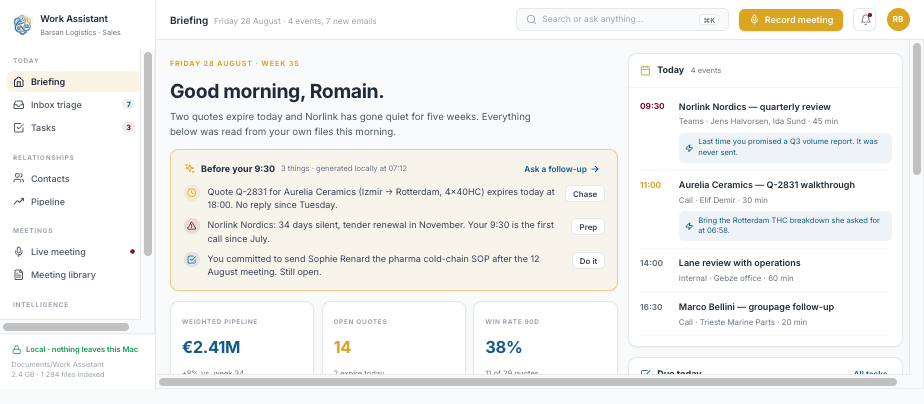
Briefing — opens on “Good morning, Romain,” followed by a “Before your 9:30” card that lists three items pulled from the rep’s own files — a quote expiring today, an account that has gone quiet for five weeks, a commitment from a past meeting still open — each with a single action (Chase, Prep, Do it). Below it, three KPI cards: weighted pipeline, open quotes, win rate. A day agenda sits on the right.

Context

Work Assistant started as an Electron app used internally by a freight-forwarding sales team (sample data shown throughout: Barsan Logistics). The original interface combined a CRM, meeting notes, and email handling in a dense, utilitarian layout. This project is a full visual and interaction redesign, built as an interactive prototype rather than shipped code.

The problem

Sales reps at a logistics company track four things at once: a pipeline of freight quotes, a contact book of shippers and carriers, a stream of emails with hard deadlines (rate confirmations, bookings), and calls that generate commitments no one tracks. The original app treated these as separate tools, with nothing surfacing what mattered before it became urgent, and no link between a quote and the email or call that created it.

Approach

Softening a spreadsheet-dense tool without hiding the data

The redesign keeps the CRM’s real structure — contacts, companies, quotes, tasks — but rebuilds the visual language around a warm gold / blue / burgundy palette on white and light-gray backgrounds, Inter throughout, 12–16px rounded cards, and soft shadows.

Six screens to close the gaps

  • Morning briefing — surfaces what needs attention before the day’s first meeting
  • Opportunity/quote pipeline — a kanban view of freight quotes by stage
  • Live meeting co-pilot — real-time transcript with speaker split and detected commitments during a call
  • Inbox triage — turns incoming emails directly into dated tasks
  • Weekly review — a rollup of the week’s meetings, quotes and tasks
  • AI routing & privacy settings — per-task control over which jobs run on-device vs. in the cloud, plus a local-processing indicator used throughout the app
  • ⌘K command search — jumps to any contact, quote or task from anywhere
Work Assistant contact record

Contacts

What the files remember

A two-pane layout: a filterable people list on the left, a full contact record on the right. The record header carries a status badge (“At risk”), role and company, and a quick-stats bar — last contact, meetings, emails, open tasks, revenue YTD. Under the Activity tab, a short generated brief (“What the files remember”) summarizes nine meetings, 41 emails and six quotes into a few sentences instead of a raw timeline.

Pipeline

Quotes by stage, flags where it matters

A kanban board of quotes grouped by stage — Lead, Qualifying, Quoted, Negotiation, Won. Each card shows the shipping lane, route, value, and a status flag where relevant: “Quiet 21d”, “Expires 18:00”, “Doc owed”, “At risk”.

Kanban pipeline of freight quotes
Live meeting transcript with co-pilot rail

Live meeting

Commitments caught as they are made

A live transcript during a call, with each speaker color-coded and their talk-time share tracked. A “Co-pilot” rail on the right suggests follow-up questions grounded in account history (“Same objection lost 40% last tender”) and logs commitments detected in the conversation as they’re said, each with a Keep/Discard action.

Inbox triage

The inbox empties into tasks

Each incoming email is paired directly with the tasks proposed from it, with due dates attached, so the inbox empties into tasks instead of sitting as unread mail.

Inbox triage turning emails into tasks
AI routing and privacy settings

AI & privacy

One row per job, one count of what left

A routing table, one row per job — live transcription, meeting summaries, clarifying questions, task extraction, ask-anything answers — showing whether it runs on-device or in the cloud and which model, next to a running weekly count of what actually left the machine.

Design notes

01

Color as function, not decoration.

Gold marks primary actions, blue marks trust and data (KPIs, the assistant), burgundy marks risk and urgency (overdue counts, at-risk badges).

02

Local-first as a visible motif.

A green lock icon and “nothing leaves this Mac” label recur across the shell, tying the AI & privacy settings back to what the rep sees on every other screen.

03

Consistent iconography and card language.

A single icon set, 12–16px corner radii, and soft shadows carried across every screen, so six very different jobs (CRM, quotes, transcription, email, settings) read as one product.

Deliverable

A clickable prototype covering the full shell — briefing, contacts, pipeline, meetings, inbox and settings — with sample freight data throughout.

Next project

What I build.

Five capability groups. Technology is listed only where it has actually shipped something.

{{ c.n }}

{{ c.name }}

{{ c.desc }}

{{ c.techLabel }}
{{ t }}

From problem to production.

Technology is selected after understanding the problem, not before.

{{ s.n }}

{{ s.name }}

{{ s.note }}

{{ i }}

I do not start by asking which framework to use. I start by asking what work needs to be done.

Product & Automation Engineer

Romain Youssofi

I work between business and engineering. I like understanding how an organization actually operates, finding where software can remove friction, and building the product that solves the problem.

French, based in Thailand, working internationally. My work has moved from enterprise consulting to automation, from automation to products, and from products to systems that handle language, documents and audio.

Download Resume ↓ Contact →
[PROFESSIONAL PORTRAIT]

The progression

{{ c.years }} {{ c.era }} {{ c.org }} {{ c.what }}

Teaching and communication

I have spent years teaching and working in education, and I am President of SupEducation. It is not my primary identity as an engineer, but it is why I can explain a system to the people who have to use it.

{{ s }}

Founded 2021

RPA Solutions

Automating work, one process at a time.

RPA Solutions began in 2021 with a focus on virtual employees: software capable of executing repetitive business processes across existing systems. The same objective now runs through everything I build.

What a virtual employee did

{{ s.n }} {{ s.label }} {{ s.system }}

Historical projects

Each case answers the same four questions: what was manual, what the virtual employee did, which systems it operated, and what happened when something failed.

Historical project {{ h.year }}
{{ h.domain }}
{{ q }}
[ADD HISTORICAL PROJECT DETAIL]

Continuing a project

Existing RPA Solutions projects and new digital projects in France can be supported through KerDigital.

Contact →

Experiments.

Smaller systems and prototypes exploring new approaches in automation, AI and cross-platform software. None of these are client deployments.

{{ l.status }}

{{ l.name }}

{{ l.desc }}

Workflow
{{ f.n }} {{ f.label }}

Build something useful.

Based in Thailand. Open to opportunities involving product engineering, software, automation, AI and digital transformation.

{{ c.label }} {{ c.value }}
Projects in France Project delivery in France is available through KerDigital.